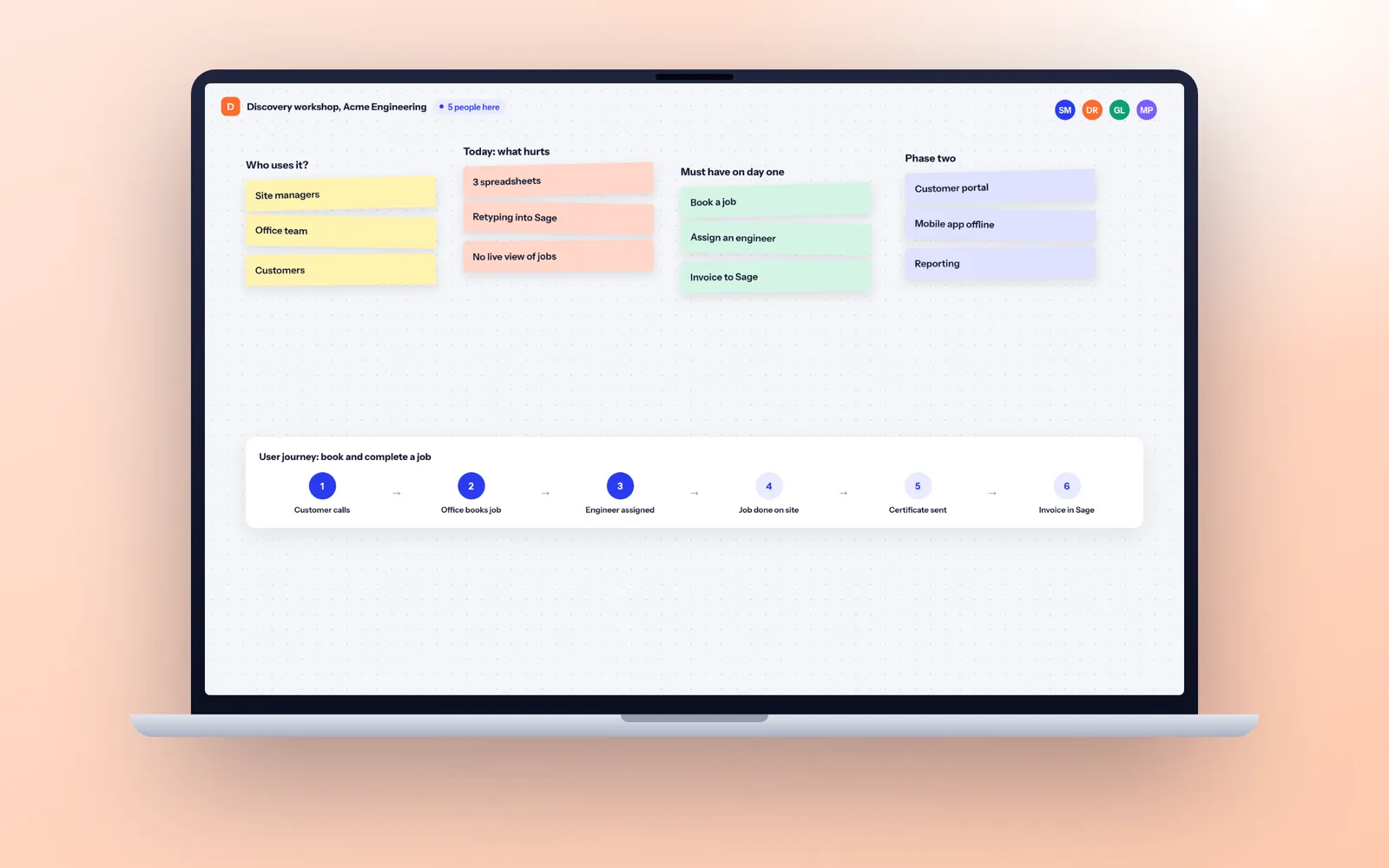
A good software specification describes the problem, the users, what each user must be able to do (as prioritised user stories with acceptance criteria), the data, the integrations and the non-functional requirements such as security and performance. For a typical business system that is 15 to 40 pages, written over 2 to 4 weeks. Leave out screen designs, database structures and technology choices unless they are genuine constraints.
What a specification is for
A specification has three jobs. It lets every supplier plan against the same thing, so you can compare approaches. It becomes the baseline for scope, so both sides know what is in and what is a change. And it forces your own team to agree what they want before anyone writes code, which is the easiest moment to change your mind.
It is not a design document or a contract, although it usually ends up attached to one.
The National Audit Office, reviewing 25 years of government IT, found a consistent pattern of underperformance, often because programmes were "not being sufficiently thought through before key decisions on technology solutions are made". Our guide to why software projects fail covers the rest of the evidence.
How long and how detailed it should be
Length should follow risk and complexity, not a template. These are rough guides from writing and reading specifications, not hard rules.
| Project type | Specification length | Time to write |
|---|---|---|
| Small internal tool or integration | 5 to 15 pages | 1 to 2 weeks |
| Business system, portal or MVP | 15 to 40 pages | 2 to 4 weeks |
| Platform with several user types and integrations | 40 to 80 pages | 4 to 6 weeks |
| Regulated, or replacing a core system | 80 pages plus appendices | 6 weeks or more |
Time to write means elapsed time with a few hours a week from the people who know the process. The biggest delay is usually waiting for decisions.
The specification template, section by section
Use this outline. Not every project needs every heading at the same depth, but every heading should have at least a sentence, even if that sentence is "not applicable, because...". A blank section is where surprises hide.
| Section | What goes in it | Example |
|---|---|---|
| 1. Background | Who you are, what the business does, why this project exists now | "40 engineers servicing boilers across the South East; jobs booked in a spreadsheet." |
| 2. Goals and measures | The outcome in numbers, so you can tell later whether it worked | "Cut the time from job completion to a signed-off job report from 9 days to 1." |
| 3. Users and roles | Every type of user, how many, what each may see | "4 office staff, 40 engineers on phones, 1 operations manager, customers (about 6,000)." |
| 4. Current process | How the work is done today, step by step, including the workarounds | A flow from enquiry to completed job, showing where data is retyped |
| 5. Requirements | What each user must be able to do, written as user stories, each with a priority | "As an engineer, I want to see tomorrow's jobs on my phone, so that I can plan my route." |
| 6. Acceptance criteria | For each story, the conditions that prove it works | "Given a job is assigned after 6pm, when the engineer opens the app, then it appears in tomorrow's list." |
| 7. Data | Main records, volumes, where existing data lives, what must be migrated | "6,000 customers and 45,000 past jobs in Excel and Access; 120 new jobs a day." |
| 8. Integrations | Every system it must talk to, which direction, and how often | "Sync customers with HubSpot nightly; send SMS through Twilio; staff sign in with Microsoft 365." |
| 9. Reporting | The questions managers need answered, and how often | "Weekly first time fix rate by engineer; jobs overdue by more than 48 hours, daily." |
| 10. Non-functional requirements | Performance, availability, accessibility, devices and browsers | "Works on Android 12+ and iOS 16+; office screens load in under 2 seconds; WCAG 2.2 AA." |
| 11. Security and data protection | Who sees what, sign-in rules, personal data held, where it is stored, retention | "Customer names, addresses and phone numbers; hosted in the UK; job records kept 6 years." |
| 12. Constraints | Deadlines, systems you must keep, hosting or technology rules | "Must be live before the March service season; Sage 200 stays as it is." |
| 13. Out of scope | What this project will not do, stated plainly | "No stock control; no customer self-booking in phase one." |
| 14. Assumptions and open questions | Things you believe but have not confirmed, and decisions still to make | "We assume HubSpot stays as the CRM; open: do subcontractors need logins?" |
The sections people skip most often are 4 and 13. The current process shows where the real complexity is: the exceptions and the spreadsheet someone keeps on the side. The out of scope list stops arguments later about what was promised.
How to write user stories
A user story describes one thing one type of user needs to do, and why. The standard form is:
As a [type of user], I want [to do something], so that [I get some outcome].
The "so that" part matters most. It tells the developer what problem they are solving, which often points to a simpler way of doing it than the one you had in mind. Here are stories for the hypothetical field service firm from the template above:
- As an office scheduler, I want to drag a job onto an engineer's day, so that I can rebook work when someone is off sick.
- As an engineer, I want to record parts used and take photos on my phone, so that the office does not have to call me after every job.
- As an office manager, I want each completed job to produce a service certificate and email it to the customer, so that the paperwork goes out the same day.
- As a customer, I want a text the day before with a two hour arrival window, so that I do not wait in all day.
Keep each story small enough to build and test in a few days. "As a manager, I want reporting" is a heading, not a story.
Acceptance criteria: examples that remove ambiguity
Acceptance criteria are the tests that prove a story is done. Without them, "done" means whatever the developer thought it meant. The most useful format is Given, When, Then, because it forces you to state the starting situation, the action and the result.
Worked example: service certificate by email
Story: As an office manager, I want each completed job to produce a service certificate and email it to the customer, so that the paperwork goes out the same day.
- Given a job is marked complete with every safety check recorded, when the engineer submits it, then a PDF certificate is created within 5 minutes and emailed to the customer address on the job.
- Given the customer has no email address on file, when the certificate is created, then it is queued for posting and appears on the office exceptions list.
- Given an appliance failed a safety check, when the job is submitted, then the certificate shows the failure clearly and the office manager is alerted the same hour.
- Given the email service is unavailable, when sending fails, then the system retries for 24 hours and the job shows on the exceptions list until it succeeds.
Notice the criteria cover the unhappy paths: missing data, failures and exceptions. That is where most of the build time goes, and it is exactly what a vague specification leaves out.
Prioritising: what must be in the first release
Give every story a priority. The most widely used method in the UK is MoSCoW: Must have, Should have, Could have and Won't have this time. The trick is being honest about Must. A Must have is something without which the system cannot go live at all, not something important.
The DSDM method that created MoSCoW recommends that Must haves take no more than 60 percent of the effort, with Should and Could making up the rest. That remaining share is your contingency. If something takes longer than planned, a Could have drops out and the launch date holds. If everything is a Must, there is nothing to give, and either the date or the scope moves.
A practical test: if the release went live without this story, could the team still do the work, even with a workaround? If yes, it is not a Must.
Data, integrations and non-functional requirements
These sections shape the design and the timeline more than the features do. Specific numbers help a supplier more than long descriptions.
- Volumes: how many users, records and transactions, today and in three years. "About 120 jobs a day, 400 in peak season" changes the design. "Lots of jobs" does not.
- Data migration: where the existing data lives (Excel, Access, an old CRM), how much there is and how clean it is. Migrating 10 years of messy history can take as long as building a feature.
- Integrations: name the product and the edition, for example "HubSpot Sales Hub" or "Sage 200 on premises". Say which direction data flows and how fresh it must be. A nightly sync is far simpler to build and run than real time. Our integration service page explains what makes one hard.
- Availability: the hours it must work and what happens if it is down for an hour. "Office hours, Monday to Saturday" and "24/7 because customers book online" are very different builds.
- Devices and accessibility: phones, tablets, desktop, which browsers, whether engineers work offline in basements, and whether public facing parts must meet WCAG 2.2 AA.
If you do not know an answer, write it down as an open question. That is far better than leaving it out, because the supplier will make an assumption and you will not see it until late in the build.
Security, data protection and reporting
Security requirements belong in the specification, not in a conversation after launch. State who can see what, by role, and whether you need:
- Single sign-on with Microsoft 365 or Google Workspace.
- Multi-factor authentication for all staff, or only for admin users.
- An audit log of who changed what, and how long it is kept.
- A penetration test by an independent tester before launch.
- Hosting in a UK or EU region, in your own company's account.
For UK GDPR, list the personal data the system will hold, why you hold it, how long each type is kept and how people can ask for their data or have it deleted. If you are unsure of any of that, the Information Commissioner's Office publishes plain guidance for organisations. Our security page shows how we handle these points on every project.
Reporting is the other section people leave vague. "Management reports" tells a developer nothing. Write down the questions managers ask and how often, for example "jobs overdue by more than 48 hours, daily". Each one becomes a story with its own acceptance criteria.
What to leave out of a software specification
Overspecifying does as much harm as underspecifying: it ties the developer to your first idea and buries the important requirements. Leave out:
- Screen designs and pixel layouts. Rough sketches of what a user needs to see are useful. Finished mock ups made in PowerPoint are not, because the designer will redo them properly.
- Database tables and field lists. Describe the information you need to record and why. Let the developer design the structure.
- Technology choices, unless they are real constraints. "Must run on our Microsoft Azure tenancy" is a constraint. "Should use React" is usually a preference picked up from an article.
- Every possible future feature. Put phase two ideas in a separate parking list. Suppliers will otherwise plan for them, or worse, design around them.
- Legal terms and contract clauses. These belong in the contract. Our guide to the software development contract covers what to put there.
Mistakes we see most often
| Mistake | Why it hurts | Fix |
|---|---|---|
| Describing the solution, not the problem | You get your first idea instead of the best one | Write the "so that" for every story |
| Words like fast, simple, intuitive, user friendly | Untestable, so everyone reads them differently | Replace with a number or an acceptance criterion |
| No current process | Hidden exceptions surface mid build as change requests | Map today's process, including the workarounds |
| No volumes | The design may not cope, or may be overbuilt | Give today's numbers and a three year estimate |
| Assuming an integration is easy | Some systems have no usable API | Name the product and edition and ask suppliers to confirm |
| Everything is a Must have | No room to absorb surprises | Keep Musts to about 60 percent of effort |
| Written by one person alone | Misses what the people doing the work need | Interview at least one user from every role |
An hour sitting with the people who do the work usually turns up more exceptions than a week of meetings.
From specification to a delivery plan
There are two routes. You can write the specification yourself and send it to three suppliers, asking each for the team, the effort per feature and a timeline in weeks, not just an end date. Our guide to choosing a software development company lists the other questions to ask.
Or you can write it with a supplier. That is what a discovery phase is: two to four weeks of workshops with your team and a review of your current systems and data, ending in a written specification, a prioritised backlog, a clickable prototype of the key screens and a delivery plan in weeks. You own the specification either way, so you can take it to another team. A typical plan that comes out of discovery looks like this:
| Phase | What happens | Typical length |
|---|---|---|
| Discovery | Workshops, specification, clickable prototype, prioritised backlog and release plan | 2 to 4 weeks |
| Setup | Repository and hosting created in your accounts, test and live environments, design basics | 1 to 2 weeks |
| Build sprints | Two-week sprints, each ending with a demo of working software on a test link | 6 to 20 weeks, depending on scope |
| Acceptance testing | Your users test against the acceptance criteria; trial runs of the data migration | 1 to 2 weeks |
| Launch and warranty | Go live, then defects against the specification fixed under warranty | 30 days |
Because every Must have story has acceptance criteria, each sprint demo is a check against the specification rather than a matter of opinion. You can see the full rhythm on our how we work page.
Checklist before you send it out
- Every user type is listed with a rough number of people.
- The current process is written down, including the workarounds.
- Every requirement is a user story with a "so that".
- Every Must have story has acceptance criteria, including what happens when things go wrong.
- Must haves are no more than about 60 percent of the list by effort.
- Every integration names the product, the edition and the direction of data.
- Security, availability, devices and accessibility are stated.
- Where personal data will be stored, and for how long, is stated.
- There is a clear out of scope list.
- Someone who does the work every day has read it and agrees.
The last point matters most. A specification the people doing the work have not read describes the process as managers think it runs, not as it actually does.
Questions
What should a software specification include?
Background and goals, every type of user, the current process, requirements written as prioritised user stories with acceptance criteria, data and volumes, integrations, reporting, non-functional requirements (performance, availability, devices, accessibility), security and data protection, constraints such as deadlines and systems you must keep, an out of scope list, and open questions.
How long should a software specification be?
As long as it needs to be for the risk involved. A small internal tool may need 5 to 15 pages. A business system, portal or MVP is usually 15 to 40 pages. Larger platforms or regulated systems can run to 80 pages or more with appendices. Clarity matters more than length.
What is the difference between a functional and a non-functional requirement?
A functional requirement says what the system does, for example "email a service certificate when a job is completed". A non-functional requirement says how well it does it: speed, availability, security, accessibility, supported devices. Non-functional requirements often shape the design more than the features do, so they need numbers.
Should I write the specification myself or use a discovery phase?
If you have someone who knows the process well and can give it a few hours a week for a month, writing it yourself works, especially for small projects. For larger or less certain projects, discovery with a supplier is usually quicker and catches technical risks you cannot see. At Fixology discovery takes two to four weeks and you own everything it produces.
What is an acceptance criterion?
A specific, testable condition that proves a user story works. The common format is Given (the starting situation), When (the action), Then (the result). Good acceptance criteria cover failures and exceptions as well as the normal case, because that is where most disagreements about "done" come from.
Is there a software specification template I can use?
Yes. The 14 part outline in this guide works for most business systems: background, goals, users, current process, user stories, acceptance criteria, data, integrations, reporting, non-functional requirements, security and data protection, constraints, out of scope, and open questions. Copy the headings into a shared document, write at least one sentence under each, and mark anything unknown as an open question.