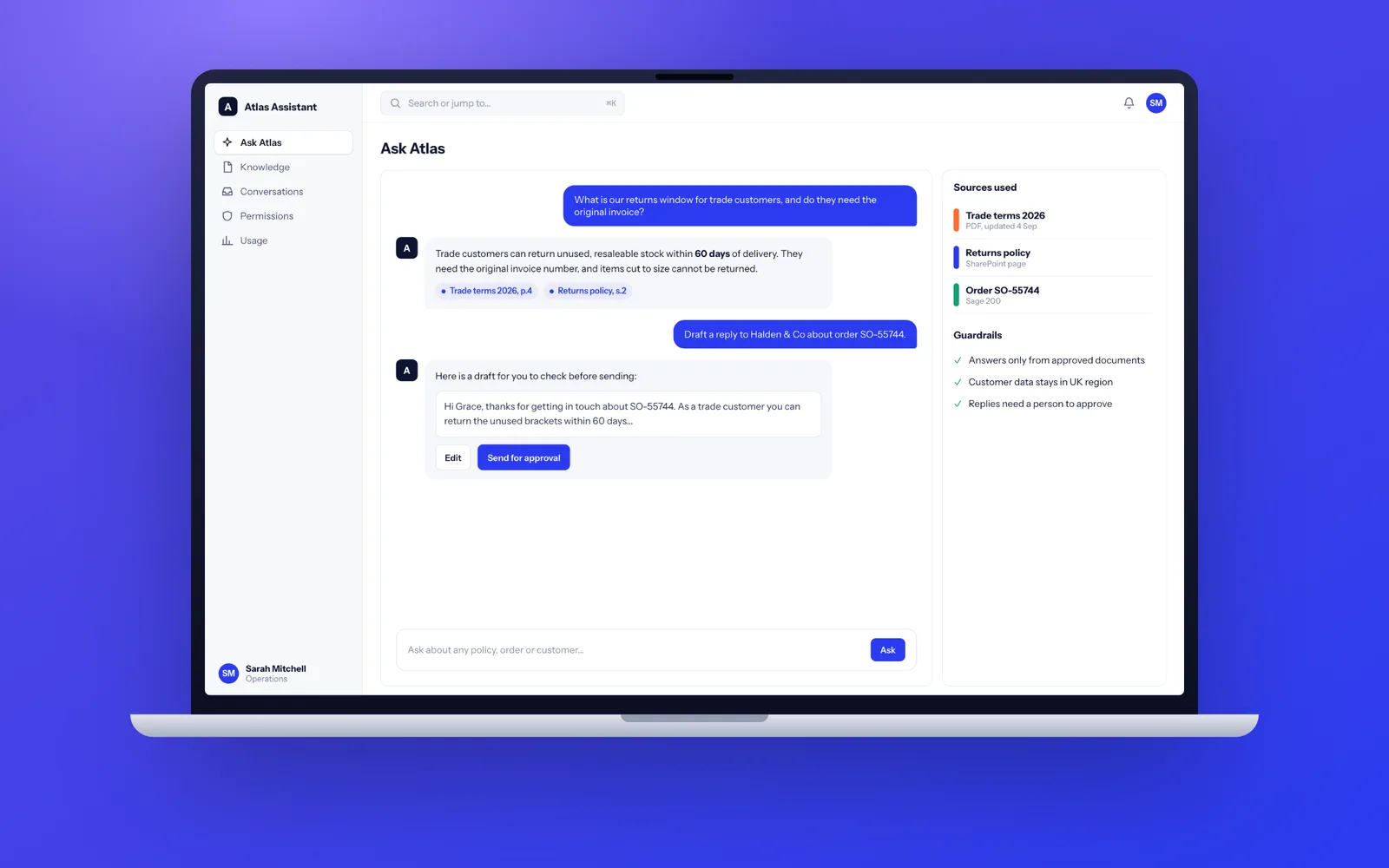
Fixology builds AI into the systems you already use: document extraction, drafting, assistants that answer from your own files with sources, and agents that act with a person approving the risky steps. A focused AI feature takes 2 to 4 weeks, an assistant over your documents 6 to 10 weeks, and an agent across several systems 8 to 14 weeks. Every build is scored against your real examples, runs under UK GDPR and belongs to you.
AI features we build for UK businesses
Most useful business AI is not a chatbot on the homepage. It is a large language model (LLM) doing one well-defined job inside a system your team already uses, with the output checked before it matters.
- Extraction from documents. Reading supplier invoices, delivery notes, CVs, contracts or claim forms and turning them into structured data for Xero, Sage, your CRM or an ERP, with low-confidence fields flagged for a person.
- Drafting. First drafts of proposals, tender answers, customer replies or case notes, written from your own templates and data, for a member of staff to edit and send.
- Classification and routing. Sorting a shared inbox or ticket queue by type, urgency and team, and pulling out order numbers and account details on the way.
- Assistants over your documents. A tool that answers staff questions from your policies, product manuals, past proposals or knowledge base, and shows the source for every answer.
- Customer service cover. Answering repeated questions on your website or WhatsApp out of hours, and handing anything complex to a named person.
This is AI integration in the practical sense: we build these as part of real software, connected through proper API integrations to the systems that hold your data, not as a separate tool someone has to remember to open.
Assistants that answer from your own documents (RAG)
Retrieval-augmented generation, usually shortened to RAG, is the standard way to make an LLM answer from your information instead of its general training. When someone asks a question, the system first searches your documents for the most relevant passages, then gives only those passages to the model and asks it to answer from them, citing where each point came from.
The model is the easy part. The work that decides whether staff trust the answers is everything around it:
- Getting the documents in. SharePoint, Google Drive, a document management system, PDFs and scanned files all need different handling. Tables and scanned forms are where weak builds fall over.
- Splitting and indexing. Documents are broken into sections and stored with embeddings (numeric fingerprints of meaning) in a search index, usually PostgreSQL with pgvector, so there is no extra database to run.
- Permissions. If a junior member of staff cannot open the HR folder, the assistant must not cite it either. Access rules are applied at search time, before the model sees anything.
- Freshness. When a policy changes, the index updates within minutes, and old versions stop being cited.
- Saying "I do not know". If nothing relevant is found, the assistant says so and points to a person, rather than filling the gap with a plausible guess.
AI agents with a human approval step
An AI agent is software that decides which steps to take to finish a task, calling tools such as your calendar, CRM or order system along the way. That is useful and also where the risk sits, because an agent that can act can also act wrongly.
We design every agent around a clear line between what it may do alone and what needs a person. Reading data, drafting and preparing are usually fine to automate. Anything that moves funds, makes a commitment to a customer, sends a new kind of email, deletes records or changes a contract waits in an approval queue, where a member of staff sees exactly what the agent intends to do and why, then approves, edits or rejects it.
Each agent also gets hard limits enforced in ordinary code, not in the prompt: the records it may change, the systems it can touch, the number of actions in an hour. Every step is written to an audit log you can read. As the approval history builds, you can choose to let reliable actions run unassisted, on evidence rather than by default.
How we test AI before it goes live
LLM output varies, so clicking through once proves nothing. We build an evaluation set at the start of every AI project and use it to decide when the feature is good enough.
- Collect real examples. Typically 50 to 200 real questions, documents or tickets from your business, with the right answer agreed by someone who knows the work.
- Agree the bar. For example: 95 percent of invoice fields extracted correctly, every answer citing a real source, zero answers on topics outside scope.
- Score every change. Each new prompt, model or retrieval tweak runs against the whole set, so improvements are measured and regressions caught before release.
- Keep testing after launch. Real conversations are reviewed and the difficult ones added to the set.
You see the scores at each two-week demo. If the feature cannot reach the bar you agreed, you find out in week three, not after launch.
Prompt injection, outages and model changes in live AI
An AI feature that passes its tests still has to survive the real world. Three risks are specific to LLM systems, and we design for each of them from the first sprint.
Prompt injection
A document, email or web page can contain text written to hijack the model, such as an instruction to ignore its rules or reveal other data. We treat everything the model reads as untrusted. The model never holds credentials, tools check permissions in ordinary code before acting, and output that would trigger an action is validated against a strict format before anything happens.
Provider outages and slow responses
Model APIs have bad days. Every call has a timeout and a retry, long jobs run on a queue rather than making staff wait, and where it matters a second provider is configured as a fallback. If AI is unavailable, the system degrades to the manual process instead of failing.
Model changes
Providers retire and update model versions regularly. We pin the exact version in use, keep prompts under version control alongside the code, and rerun the evaluation set before any switch. Rate limits stop a runaway loop flooding the provider.
UK GDPR, client data and model training
The consumer chat apps and the business APIs treat your data differently. The business API terms and data processing addenda of the main providers state that what you send is not used to train their models by default. We check the current terms for the provider and model you use, record them, and do not use consumer accounts for client work.
The rest is ordinary UK GDPR done properly:
- A data protection impact assessment where the system processes personal data in a new way, which most AI projects do. We draft the technical sections for you.
- UK or EU processing where the provider offers it, for example through Microsoft Azure or AWS regions, and a record of every sub-processor.
- Personal data removed or masked before it reaches the model when the task does not need it.
- A person involved in any decision with legal or similarly significant effects on someone, such as credit, hiring or access to a service.
The ICO publishes detailed guidance on AI and data protection, and we have written a plain-English summary in AI and UK GDPR for small businesses. Our wider approach is on the security page.
When AI is the wrong tool
We will tell you when a different approach would do the job better. AI is usually the wrong choice when:
- The rules are already known. If a person could write the logic as a flowchart (VAT rules, approval limits, discount tables), ordinary code is faster to run and right every time.
- The answer must be exact every time. Payroll, stock levels and financial reporting need deterministic calculations. An LLM can help explain a figure, not produce it.
- The real problem is the data. If customer records live in four systems that disagree, an AI layer on top will answer confidently from the wrong one. Fix the data flow first, which is the argument in our piece on data plumbing before agents.
- Volume is low. If the task happens ten times a week, a better form or template is often the more sensible fix.
In those cases we will usually point you at business process automation instead, which often removes the work that made AI look necessary.
Models and tools we use
We are not tied to one provider. Most work runs on the commercial APIs from Anthropic (Claude), OpenAI and Google (Gemini), chosen per task on accuracy, speed and where the data is processed. For clients who need data to stay entirely within their own infrastructure, open-weight models such as Llama or Mistral can run on private servers, with a trade-off in capability that we spell out before you commit.
We keep the model behind a thin layer in the code, so changing provider is a configuration change plus an evaluation run, not a rewrite. Around it we use the tools you would expect in any well-built system: TypeScript or Python, PostgreSQL, queues for long-running jobs, and n8n where a visual workflow suits the people who will maintain it.
How an AI project runs and what you own
Every AI project starts small, and you speak directly to the AI developers doing the work, not an account manager. A one to two week discovery tests the idea on your real data, agrees the evaluation bar and fixes the scope. We then build in two-week sprints with a demo on a test link and evaluation scores each time, starting with the narrowest useful version and widening it once it proves itself.
You own all of it: the code, prompts, evaluation set, integrations and the provider accounts, which sit in your company's name from day one. Nothing is a black box rented from us. If you later bring the work in-house or move to another supplier, the evaluation set and logs go with it, so whoever comes next can see exactly how well the system performs.